Si sigues el blog, sabes que TenK es mi app para registrar horas de práctica deliberada hacia las 10,000 horas. Esta semana conecté TenK con OpenClaw — el asistente de IA que uso en mi Mac — para poder interactuar con la app directamente desde el chat. Sin abrir la app. Sin buscar la pantalla. Solo "log 45 min de guitarra" y listo.
If you follow the blog, you know TenK is my app for logging deliberate practice hours toward 10,000 hours. This week I connected TenK with OpenClaw — the AI assistant I use on my Mac — so I can interact with the app directly from chat. No opening the app. No hunting for the screen. Just "log 45 min of guitar" and done.
Esto requirió construir tres cosas desde cero:
This required building three things from scratch:
- Un sistema de auth seguro para que el asistente se autentique sin passwords en el chat
- A secure auth system so the assistant can authenticate without passwords in the chat
- Una página de autorización en la app Flutter
- An authorization page in the Flutter app
- Un skill CLI que OpenClaw puede ejecutar para hablar con la API de TenK
- A CLI skill that OpenClaw can execute to talk to the TenK API
El problema: ¿cómo autentica un asistente?The Problem: How Does an Assistant Authenticate?
Cuando tu asistente de IA quiere acceder a una API tuya, tienes tres opciones:
When your AI assistant wants to access your API, you have three options:
- API Key hardcodeada — inseguro, el key vive en el contexto del chat
- Hardcoded API Key — insecure, the key lives in the chat context
- Magic Link — ok, pero requiere email y tiene UX rara
- Magic Link — ok, but requires email and has a weird UX
- OAuth Device Flow — lo mismo que usa GitHub CLI, Netflix en Smart TVs, VSCode para autenticarse. El dispositivo genera un código y tú lo apruebas desde el browser
- OAuth Device Flow — the same thing GitHub CLI, Netflix on Smart TVs, and VSCode use to authenticate. The device generates a code and you approve it from the browser
El asistente nunca ve tu contraseña. Tú inicias sesión en tu browser, apruebas o rechazas el acceso, y el asistente recibe un JWT. Exactamente como GitHub CLI.
The assistant never sees your password. You log in through your browser, approve or reject access, and the assistant receives a JWT. Exactly like GitHub CLI.
El flujo completoThe Complete Flow
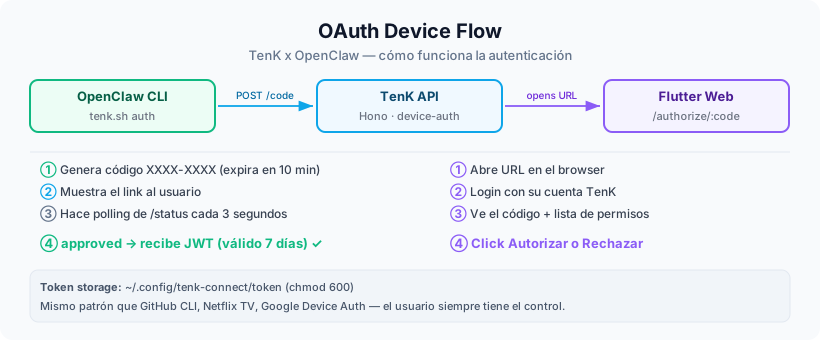
Backend: 4 endpoints en Hono + PrismaBackend: 4 Endpoints in Hono + Prisma
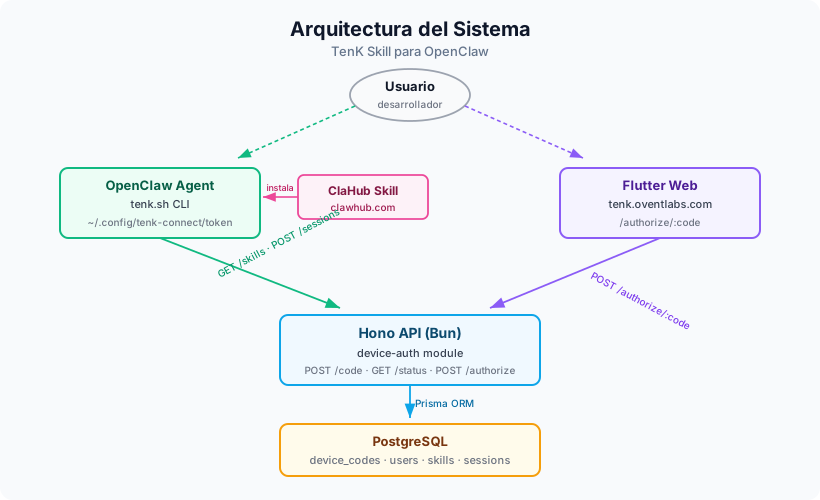
El backend corre en Bun + Hono. Agregué un módulo device-auth con su propia tabla en Postgres:
The backend runs on Bun + Hono. I added a device-auth module with its own table in Postgres:
model DeviceCode {
  id        String   @id @default(cuid())
  code      String   @unique
  userCode  String
  status    String   @default("pending") // pending | approved | expired
  userId    String?
  email     String?
  token     String?
  expiresAt DateTime
  createdAt DateTime @default(now())
  updatedAt DateTime @updatedAt
}POST /api/device-auth/code → genera XXXX-XXXX (10 min expiry)
GET /api/device-auth/code/:code/status → { status: pending|approved|expired, token? }
GET /api/device-auth/authorize/:code → página HTML fallback
POST /api/device-auth/authorize/:code → acepta JSON (sessionToken o email+password)El POST de autorización acepta dos modos:
The POST authorization endpoint accepts two modes:
- sessionToken — si el usuario ya está loggeado en la app Flutter, manda su JWT y se autoriza en un click
- sessionToken — if the user is already logged in to the Flutter app, it sends their JWT and authorizes in one click
- email + password — fallback clásico
- email + password — classic fallback
La página de autorización en FlutterThe Authorization Page in Flutter
Esta fue la parte más interesante. La web de TenK es una app Flutter (sí, Flutter Web en producción).
En lugar de servir una página HTML desde Hono, agregué una ruta /authorize/:code directamente en GoRouter.
This was the most interesting part. The TenK web is a Flutter app (yes, Flutter Web in production).
Instead of serving an HTML page from Hono, I added an /authorize/:code route directly in GoRouter.
La landing y toda la web ya son Flutter. Tendría dos sistemas de diseño si metía HTML crudo. Flutter mantiene branding consistente y puedo usar los mismos widgets, colores y el logo oficial.
The landing and all the web are already Flutter. I'd have two design systems if I added raw HTML. Flutter keeps consistent branding and I can use the same widgets, colors, and official logo.
La página tiene tres estados:
The page has three states:
Si ya estás loggeado en TenK (SharedPreferences tiene el token), salta directo al Step 2. Si el código ya expiró, muestra pantalla de error. Todo dentro del mismo widget con un enum de estados.
If you're already logged in to TenK (SharedPreferences has the token), it jumps directly to Step 2. If the code has already expired, it shows an error screen. All within the same widget with a state enum.
enum _Step { loading, login, confirm, success, rejected, expired }

// Si ya hay sesión guardada → salta a confirm
final token = await _getStoredToken();
if (token != null) {
  final user = await _fetchMe(token);
  if (user != null) {
    setState(() => _step = _Step.confirm);
    return;
  }
}
// Si no → login form
setState(() => _step = _Step.login);
El Skill CLIThe CLI Skill
Un skill de OpenClaw es básicamente un SKILL.md con instrucciones para el agente
más archivos de soporte (scripts, assets). El agente lee el SKILL.md cuando detecta que la tarea
aplica, y sigue las instrucciones.
An OpenClaw skill is basically a SKILL.md with instructions for the agent
plus support files (scripts, assets). The agent reads the SKILL.md when it detects the task
applies and follows the instructions.
El CLI tiene 7 comandos:
The CLI has 7 commands:
auth— device flow + polling hasta aprobadodevice flow + polling until approvedskills— lista habilidades con horas acumuladaslists skills with accumulated hoursstats— total de horas y % hacia 10,000htotal hours and % toward 10,000hlog <skill> <min> [nota]— registra sesión (fuzzy match por nombre)logs session (fuzzy match by name)streak— cuándo practicaste por última vez cada skillwhen you last practiced each skillwhoami/logout
El primer draft construía el payload JSON concatenando strings en bash — un clásico vector de inyección. Lo corregí usando python3 -c "import json, sys; print(json.dumps(...))" con el argumento del usuario pasado como sys.argv[1], nunca interpolado.
The first draft built the JSON payload by concatenating strings in bash — a classic injection vector. I fixed it using python3 -c "import json, sys; print(json.dumps(...))" with the user's argument passed as sys.argv[1], never interpolated.
La validación de seguridad de ClaHubClaHub Security Validation
ClaHub (el repositorio de skills de OpenClaw) tiene un scanner automático antes de publicar. El primer intento me flaggeó unicode control characters en el SKILL.md.
ClaHub (the OpenClaw skills repository) has an automatic scanner before publishing. The first attempt flagged unicode control characters in the SKILL.md.
Curioso porque mi propio scanner decía "CLEAN". El problema: yo buscaba bytes < 0x09 o entre 0x0a-0x20.
Pero hay caracteres Unicode en categorías Cf (format) y Cc (control) que pasan ese filtro.
Los emojis en el markdown (, , ) fueron el culpable.
Curious, because my own scanner said "CLEAN". The problem: I was looking for bytes < 0x09 or between 0x0a-0x20.
But there are Unicode characters in Cf (format) and Cc (control) categories that pass that filter.
The emojis in the markdown (, , ) were the culprit.
La solución: reescribir todos los archivos del skill como pure ASCII:
The solution: rewrite all skill files as pure ASCII:
python3 -c "
import unicodedata
text = open('SKILL.md').read()
weird = [(i, hex(ord(c)), unicodedata.name(c,'UNKNOWN'))
         for i, c in enumerate(text)
         if unicodedata.category(c) in ('Cf','Cc','Cs') and c not in '\n\r\t']
print('CLEAN' if not weird else f'BAD: {weird[:5]}')
"
Después de limpiar: todos los archivos CLEAN. El scanner pasó en el segundo intento.
After cleaning: all files CLEAN. The scanner passed on the second attempt.
Arquitectura del sistemaSystem Architecture
La landing page actualizadaThe Updated Landing Page
Con el skill funcionando, actualicé la landing de TenK para comunicar la integración. Agregué una sección oscura antes del footer con:
With the skill working, I updated the TenK landing to communicate the integration. I added a dark section before the footer with:
- Logo oficial de TenK × logo de OpenClaw ()
- Official TenK logo × OpenClaw logo ()
- Preview de chat en terminal mostrando el skill en acción
- Chat preview in terminal showing the skill in action
- Comando de instalación:Install command:
npx clawhub@latest install tenk-connect - CTA ato openclaw.ai
Deploy y lo que quedó en producciónDeploy and What Ended Up in Production
Lo que aprendíWhat I Learned
OAuth Device Flow es subestimado. Es el patrón correcto cuando el "dispositivo" no tiene browser propio — un CLI, una TV, un asistente de IA. La mayoría de devs van directo a API keys sin pensar en alternativas más seguras.
OAuth Device Flow is underrated. It's the right pattern when the "device" doesn't have its own browser — a CLI, a TV, an AI assistant. Most devs go straight to API keys without thinking about more secure alternatives.
Flutter Web vale la pena para consistencia. Podría haber servido HTML desde Hono en 30 minutos. Pero tener la página de autorización en Flutter significa el mismo sistema de diseño, los mismos colores, el mismo logo, los mismos widgets. A largo plazo eso importa.
Flutter Web is worth it for consistency. I could have served HTML from Hono in 30 minutes. But having the authorization page in Flutter means the same design system, same colors, same logo, same widgets. Long-term, that matters.
Los scanners de seguridad son más estrictos de lo que crees. Mi checklist de "no hay secrets hardcodeados" no es suficiente. Unicode format chars en markdown pueden parecer intent malicioso. Pure ASCII es la forma más segura de distribuir archivos de configuración de agentes.
Security scanners are stricter than you think. My "no hardcoded secrets" checklist isn't enough. Unicode format chars in markdown can look like malicious intent. Pure ASCII is the safest way to distribute agent configuration files.
App: tenk.oventlabs.com
Skill: clawhub.com → buscasearch for tenk-connect
OpenClaw: openclaw.ai